results

Showing posts with label apple. Show all posts

its a test

hello this is me

Read more


Convert normal SIM to Micro SIM


The unlocker community in U.S. as well as gadget freeks worldwide are questioning if its possible to useStandard SIM with iPhone 4 or even with iPad? To be honest, nothing has changed from SIM to Micro SIM except for truncating the redundant area, which makes it possible to use your standard SIM in place of MicroSim with some basic tricks of the scissor.
As it turns out traditional SIMs measure 15 x 25mm and have that angled corner. The new micro-SIM is officially 12 x 15mm. That’s effectively the size of just the normal SIM contact area. Apple was just wanting to be clever or it just wanted everyone to be forced to buy new SIMs, either way it’s a touch annoying, but with our mighty scissors we can cut them down to size and so can you.
Video Turotial: How To Make Micro SIM for iPhone 4, iPad from SIM

Read more


iphone 4 cracked - more unknown specs

 
iPhone 4 is shipping very soon and we’ve the iFixit team tearing down iPhone 4 to reveal some great hardware.
The dissasembly reveals that replacing a damager display is a little more challenging, and the display and touch panel are all glued to the front glass, so it’s a total module replacement if the glass does break, which make it ver costly on repairs. However, the good part is the new Large  Li-ion battery  which is glued or soldered to the logic board, so it’s relatively easy to replace in case you need to.

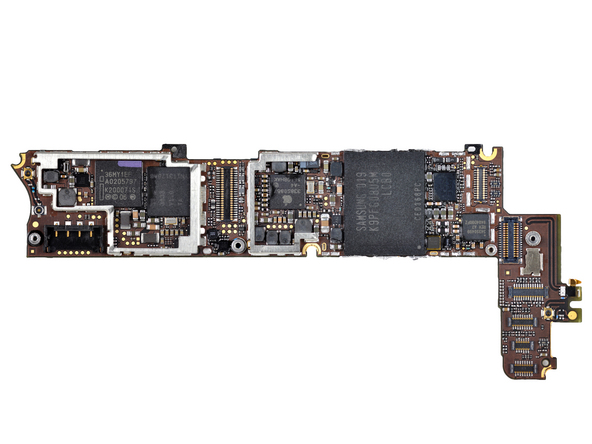
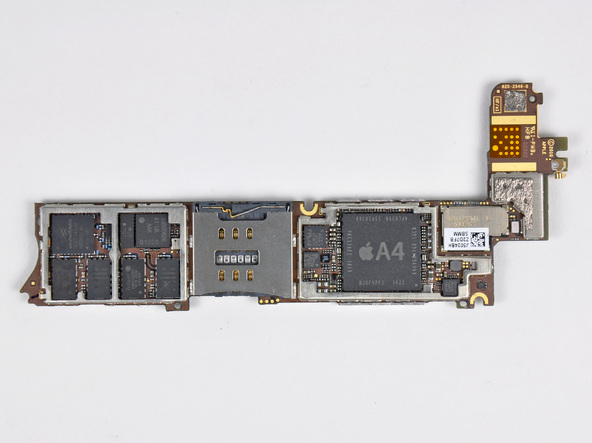
The best part of the design is its marvellous  engineering of the wireless antennas into the stainless steel frame and bezel of the phone. Without a doubt,  the new antenna design would improve reception considerably and also reduce battery consumption when in weak signal areas. Apart from that, Apple has  also tuned how the iPhone chooses an open channel. It will “utilize whichever network band is less congested or has the least interference for the best signal quality, regardless of the actual signal strength.” According to iFixit, it should improve reliability even on AT&T’s network.Behold, the Lilliputian logic board of the iPhone 4.
Aluminum-based ceramic glass for the front cover (and believed to be used for the back cover as well). Identified as Corning Gorilla Glass, it is considered ideal for touchscreen devices because of its strength, light weight, and resistance to scratching or damage.
As known earlier, iPhone 4 is powered by the Apple A4 processor, has 512MB of RAM compared to the iPad’s, iPhone 3GS’s 256MB. A good thing to have for multitasking, better game graphics, high-resolution apps. Though A4 is 1Ghz, Apple seems to have underclocked it to 800Mhz to preserve few hours of extra battery juice. As per the benchmarks too, its slower than the iPad but way faster than the iPhone 3GS.
Other Motherboard components Skyworks cell radios, Broadcom WLAN and GPS, STMicro accelerometer and gyroscope, a TRiQuint GSM chip, Samsung flash memory, Apple-branded Cirrus Logic audio codec, TI touchscreen controller, and Numonyx RAM.

Read more


Iphone 4 Tech Specs


iPhone 4


OK, hot off the Apple website, here are the iPhone 4 tech specs:
Pre-order: June 15th
Availability: June 24th
Size and weight
Height: 4.5 inches (115.2 mm)
Width: 2.31 inches (58.6 mm)
Depth: 0.37 inch (9.3 mm)
Weight: 4.8 ounces (137 grams)
Cellular and wireless
UMTS/HSDPA/HSUPA (850, 900, 1900, 2100 MHz)
GSM/EDGE (850, 900, 1800, 1900 MHz)
802.11b/g/n Wi-Fi (802.11n 2.4GHz only)
Bluetooth 2.1 + EDR wireless technology
Power and battery
Built-in rechargeable lithium-ion battery
Charging via USB to computer system or power adapter
Talk time:
  Up to 7 hours on 3G
  Up to 14 hours on 2G
Standby time:
  Up to 300 hours
Internet use:
  Up to 6 hours on 3G
  Up to 10 hours on Wi-Fi
Video playback:
  Up to 10 hours
Audio playback:
  Up to 40 hours
Capacity
16GB or 32GB flash drive
Camera, photos, and video
Video recording, HD (720p) up to 30 frames per second with audio
5-megapixel still camera
VGA-quality photos and video at up to 30 frames per second with the front camera
Tap to focus video or still images
LED flash
Photo and video geotagging
Location
Assisted GPS
Digital compass
Wi-Fi
Cellular
Display
Retina display
3.5-inch (diagonal) widescreen Multi-Touch display
960-by-640-pixel resolution at 326 ppi
800:1 contrast ratio (typical)
Fingerprint-resistant oleophobic coating on front and back
Support for display of multiple languages and characters simultaneously
Audio formats supported
AAC (8 to 320 Kbps), Protected AAC (from iTunes Store), HE-AAC, MP3 (8 to 320 Kbps), MP3 VBR, Audible (formats 2, 3, 4, Audible Enhanced Audio, AAX, and AAX+), Apple Lossless, AIFF, and WAV
Video formats supported
H.264 video up to 720p, 30 frames per second, Main Profile level 3.1 with AAC-LC audio up to 160 Kbps, 48kHz, stereo audio in .m4v, .mp4, and .mov file formats; MPEG-4 video, up to 2.5 Mbps, 640 by 480 pixels, 30 frames per second, Simple Profile with AAC-LC audio up to 160 Kbps per channel, 48kHz, stereo audio in .m4v, .mp4, and .mov file formats; Motion JPEG (M-JPEG) up to 35 Mbps, 1280 by 720 pixels, 30 frames per second, audio in ulaw, PCM stereo audio in .avi file format
Support for 1024 by 768 pixels with Dock Connector to VGA Adapter; 576p and 480p with Apple Component AV Cable; 576i and 480i with Apple Composite AV Cable (cables sold separately)
Viewable document types
.jpg, .tiff, .gif (images); .doc and .docx (Microsoft Word); .htm and .html (web pages); .key (Keynote); .numbers (Numbers); .pages (Pages); .pdf (Preview and Adobe Acrobat); .ppt and .pptx (Microsoft PowerPoint); .txt (text); .rtf (rich text format); .vcf (contact information); .xls and .xlsx (Microsoft Excel)
Sensors
Three-axis gyro
Accelerometer
Proximity sensor
Ambient light sensor
Environmental requirements
Operating temperature: 32° to 95° F(0° to 35° C)
Nonoperating temperature: -4° to 113° F(-20° to 45° C)
Relative humidity: 5% to 95% noncondensing
Maximum operating altitude: 10,000 feet (3000 m)

Read more


Turn Your iPad Into A Laptop By ClamCase


It's not even a month since the launch of iPad and its add on gadgets have started coming. A device called "ClamCase" manufactured by a company of the same name has launched this device which works as an iPad case, stand and keyboard add-on.

One only needs to place the iPad into the case and get started. From there, they can opt to keep it flat on the table or set it up in landscape view. The keyboard can be connected to the iPad via Bluetooth to give them the functionality of a laptop.

However it is a downfall that ClamCase, unlike most other laptops, won't be featuring a trackpad to help people navigate around the iPad screen. That means owners will still need to tap the display to get to where they want to go. The real function of the ClamCase, then, is to improve the typing experience and speed on the iPad and protect the tablet from damage.

ClamCase plans to launch its three-in-one add-on device in the fall. No word on the pricing yet.


Read more

About This Blog

Hangvirus
The Blog is here to guide you through the way to reach the unexpectable horizons of your knowledge. Hangvirus provides you with latest Tech updates, Tutorials, Windows Tricks and Tips, Facebook Hidden Features, and many more useful and cool tricks. because here at Hangvirus we feel everyone can do a thing but to do the unique things are called COOL.

Back links

table 2

Google Groups
Subscribe to software-engineering2010
Email:
Visit this group

table 1

Google Groups
software-engineering2010
Visit this group

addthis

AddThis

Bookmark and Share

Sponsors

Web hosting for webmasters