


Remeber those old Typewriters, they make sound everytime when you press any key. So here is a small program KCLICK that will certainly make typing a fun and its very appeling to typewriter users.
If KClick is active and you're using the keyboard to edit documents, each time you press a key you will hear a sound. Actually there are 5 soundsOne of them sounds like a typewriter, others sound like organizer beeps.
The main window contains a checkbox (to turn your sounds on) and a test edit box. Clicking in the circles (check boxes) to the left of the sound choices will let you hear those sounds. To use your sound, click the Active checkbox to enable the keyboard click.
You can download it free. Here is link for downloading kclick free.. have fun..
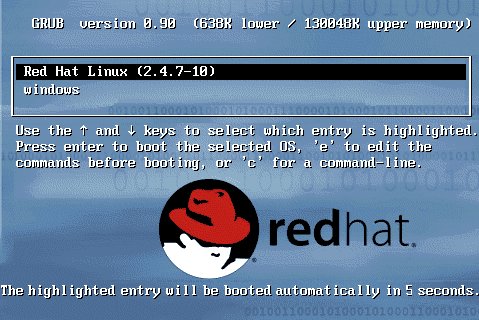
As we kno, hacking a Linux password is like hitting a ball for six.
Its so easy, bt sumtimes the admins use GRUB password which hardens the security.
But wonder, what if we can hack it as well.
So, ladies and gentlemen, here v go.
THis is the tweak..
GO, follow these steps and hack the charts..
1- Boot system with cd/dvd of RHEL.
2- At splash screen type
boot:linux rescue
3- Choose language, choose keyboard, choose no network setup.
4- Press continue, >>> ok.
5- Type following:
#chroot /mnt/sysimage
#vi /etc/grub.conf
6- Remove that password line that v created ago.
Thats it, n u r finished.
Watsay?
Queries and commenting wud be appreciated as usual.

Have you ever wondered that whether your friend read your mail or not? He/she is not replying or didnt see your mail. Wheteher your important mail reach to its destination. If yes then here is Spypig for you.
Spypig is a cool email tracking system that sends you a notification mail whenever recipient read your mail.
Its very simple to use just follow these steps:
1). Open www.spypig.com .
2). Here enter your Email id and message title.
3). It provides special image which contains tracking code, select 1 of the image provided. If you dont want that your recipient know about this tracking then select blank (white) image provided
there.
4). Select no of notifications you want and then press activate.
5). Now it will generate an image copy that image in your mail.
6). Send it.
Its done.
Now whenever your recipient open that mail you will got a notification email.
Do you know that you cant make a folder named as "con" or "prn". If u dnt believe then try to rename a folder give its new name con. It will give error that 'Specified Device name is invalid'. There are many words like con. Some of are them PRN, AUX, CLOCK$, NUL, COM1,
COM2,COM3, COM4, COM5,COM6, COM7, COM8, COM9, LPT1, LPT2,
LPT3, LPT4,LPT5, LPT6,LPT7, LPT8, LPT9.

Now for deleting it Type
rd \\.\d:\con
COM2,COM3, COM4, COM5,COM6, COM7, COM8, COM9, LPT1, LPT2,
LPT3, LPT4,LPT5, LPT6,LPT7, LPT8, LPT9.
These words are windows inbuilt reserved device names. so we cant use them.
But here I provide you a trick by which you can name a folder by any of the above specified names, So go n challenge your friends and prove your superiority..
Here is solution, follow these steps:
1) Open Command Prompt (Type cmd in Run).
2) Type md \\.\d:\con to create a con folder in d drive, You can replace d with any drive .
Its done.
Now for deleting it Type
rd \\.\d:\con
You can create Virtual Drives in your Computer. Now you can access your Favorite Folders as a drive in My Computer.
Just Do The Follwing :
1) Start >> Run
2) Type cmd and hit Enter.
This will open Command Prompt.
3) Type subst Z: E:\picture and hit Enter key.
Here Z: is your desired New Drive Letter (Do not use existing Drive letters) and E:\picture is path of your favorite folder.
 4) Now, type exit.
Its done.
This will create a new drive ! When you open this , it will open your folder !!!
Just Do The Follwing :
1) Start >> Run
2) Type cmd and hit Enter.
This will open Command Prompt.
3) Type subst Z: E:\picture and hit Enter key.
Here Z: is your desired New Drive Letter (Do not use existing Drive letters) and E:\picture is path of your favorite folder.
 4) Now, type exit.
Its done.
This will create a new drive ! When you open this , it will open your folder !!!

If you use pendrives frequently and find bit typical to click on the task bar and then safely remove the pendrive then here is a trick for you to create a shortcut for safely removal of pendrives. Just follow given steps:
2). In Create shortcut window, Type RunDll32.exe shell32.dll,Control_RunDLL hotplug.dll.

3). Click next and then .
shortcut is created.
Now you can use this shortcut to remove pendrive or you can assign a shortcut key to it.
For assigning shortcut key,
For assigning shortcut key,
1). Right click on shortcut icon.
2). Select properties.
3). In properties window, click on shortcut tab.
4). Assign a shortcut key to it(it will take clrt + alt by default)eg: if you press A shortcut will be ctrl+alt+A.

5). Click ok.
Its done.
Now you can use your keyboard shortcut key to safely remove your pendrives.

If you have multiple Google accounts—a Gmail with Google Apps account and a regular Gmail account, for example—streamline them with this script for Firefox with Greasemonkey. The script adds a “change user” drop-down bar in place of the “sign out” link.

Do you know how to make a folder without a name? is it possible? Yes it is possible you can make a folder or a file without any name. Just try this
1). Click the folder or file which you want to have no name.
2). Right click on it and then click rename and delete the old name.
3). Press ALT button from your keyboard and type 0160(holding alt) after that press enter. Note that while you will type 0160 it will not appear, but continue typing and press enter.. thats it.
Its Done.
Make sure that you are using the number pad, using just the row of numbers above the qwerty doesn’t work. For a laptop, if you dnt have number pad then check and see if there’s a pseudo-numpad that uses the fn key. then you can just hold down the fn and alt at the same time while typing in 0160.
For deleting this folder you have to rename it by using command prompt. rememver dont use space use alt+0160 as current file name.
Do you want to chat with your friends in hindi ??? or want to set your tagline in hindi???if yes then now you can do it easily. Google released Chat bots to translate English into Hindi. So now you can send text in Hindi to your friends during chats. For this you have to add google transaltion bot to your friend list. just follow this..
1) Send friend request to en2hi@bot.talk.google.com .
2) You will have a new buddy added as en2hi@bot.talk.google.com, Start Chat with it.
3) Type anything in English and it will translate it into Hindi and reply.

so you can copy the text from this window and can paste it anywhere...in chat windows or even in your status message..
Even you can chat in any language by using different google bots. Here is list of bots for some popular languages
English to German en2de@bot.talk.google.com .
English to Spanish en2es@bot.talk.google.com .
English to Franch en2fr@bot.talk.google.com .
English to Italian en2it@bot.talk.google.com .
English to japanese en2ja@bot.talk.google.com .
English to Russion en2ru@bot.talk.google.com .
English to chinease en2zh@bot.talk.google.com .


